Records & forms

Elevator inspection forms and signed Records.

Build the forms your Technicians fill in on site. Each Job produces a Record, the Building Manager signs it, and LiftAuth files it under the building.

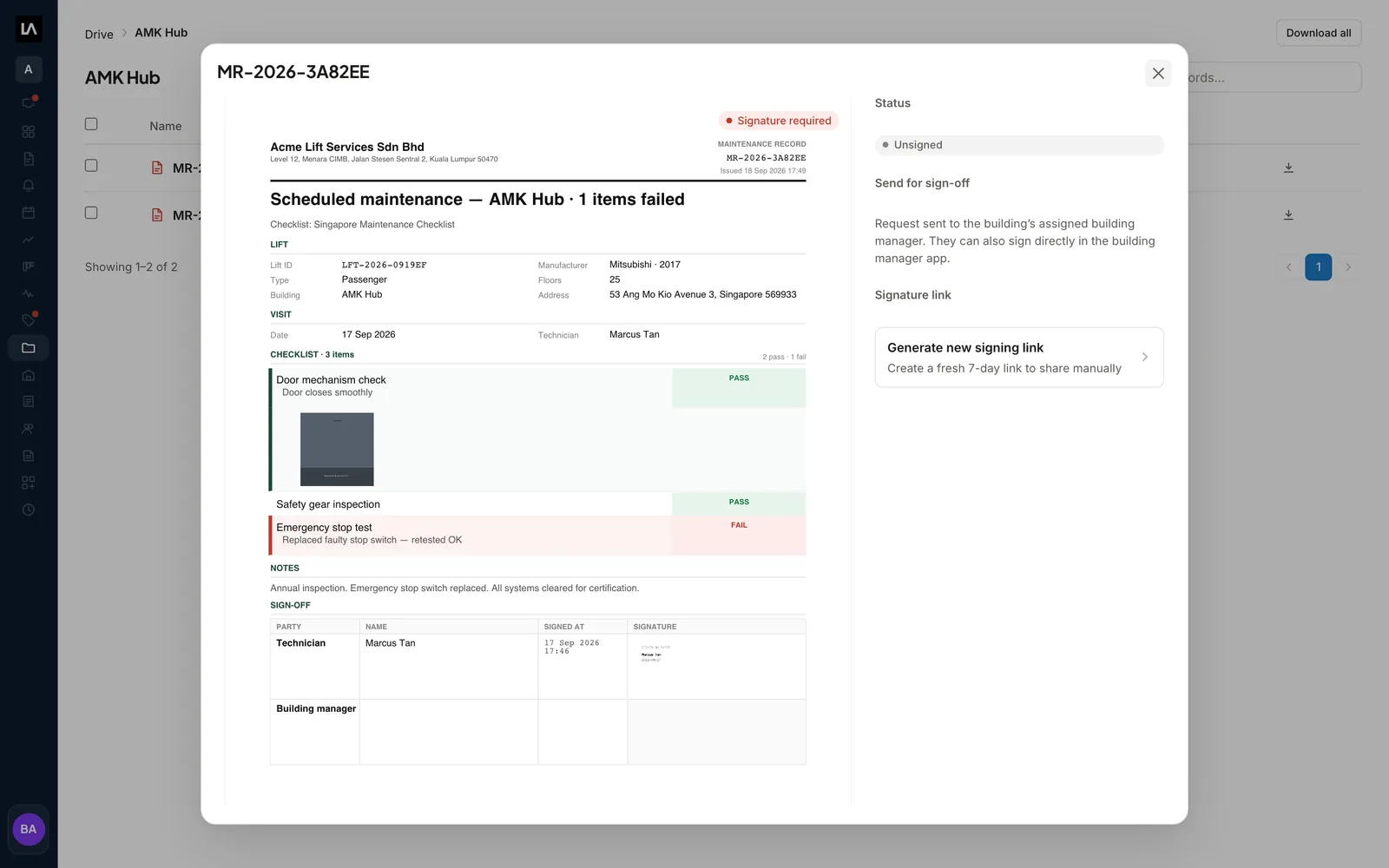
A maintenance Record open in Drive: the filled-in form with pass and fail results and a photo, beside the sign-off panel showing the request sent to the Building Manager and Generate new signing link.

What are Records and forms in LiftAuth?

A record template is the form a Technician fills in on their phone during a Job. It decides what they are asked, in what order, and what ends up on the Record the Building Manager signs.

A Record is the filled-in, signed report. Each Job produces at least one, usually one per elevator. A Record holds:

  • The result of every item on the form: a pass or fail, a reading or a note.
  • Any remarks the Technician typed, and the photos taken on site.
  • The Technician’s signature.
  • The Building Manager’s signature, if one was given.

The moment the Technician submits, LiftAuth files the Record in Drive (Files in the building manager apps) under its building.

What’s included in Records and forms.

Your own forms

Build maintenance, repair and breakdown forms in sections, with the items your Technicians answer.

Six item types

Pass/Fail/NA, Text, Select, Number, Date and Photo. A failed Pass/Fail/NA item can be raised as an Issue on the spot.

Required items and history

Block submit until an item is answered, or show the Technician the last value recorded and when.

Your PDF layout

Use the generated layout, or upload a flat PDF form and LiftAuth stamps the answers onto it.

Sign-off on site

The building representative types their name and signs on the Technician’s phone, even with no signal.

Signing links

Send a link the Building Manager opens in a browser and signs without a LiftAuth account.

Drive

A folder for each building with its Records, and one for each Building Manager with their Quotes, Invoices, payments and credit notes.

Downloads

Download one Record as a PDF, or a selection or a whole building folder as one zip file.

From your form to a signed Record in Drive.

01Build the form

Build each form once, in the office.

Add sections, then the items your Technicians answer. Write each item title as an instruction, because it is what the Technician reads on the phone.

Set the time one form takes. LiftAuth adds it up across the elevators on a Maintenance Contract to work out how long the visit should be.

Sections & itemsRequiredShow historyDuplicate
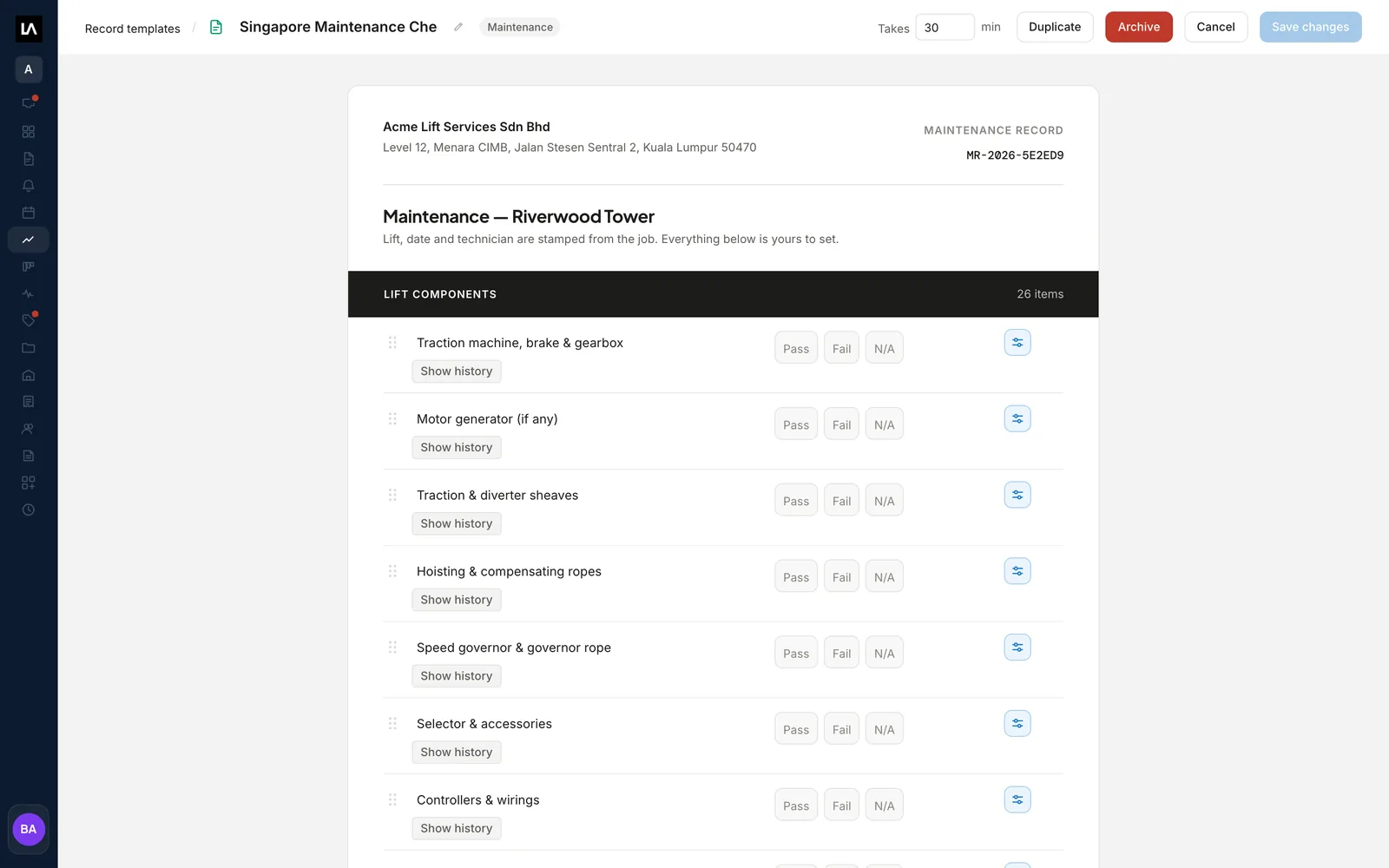
A maintenance record template in the editor, with elevator component items each answered Pass, Fail or N/A.
02On site

The Technician fills in the form and gets it signed.

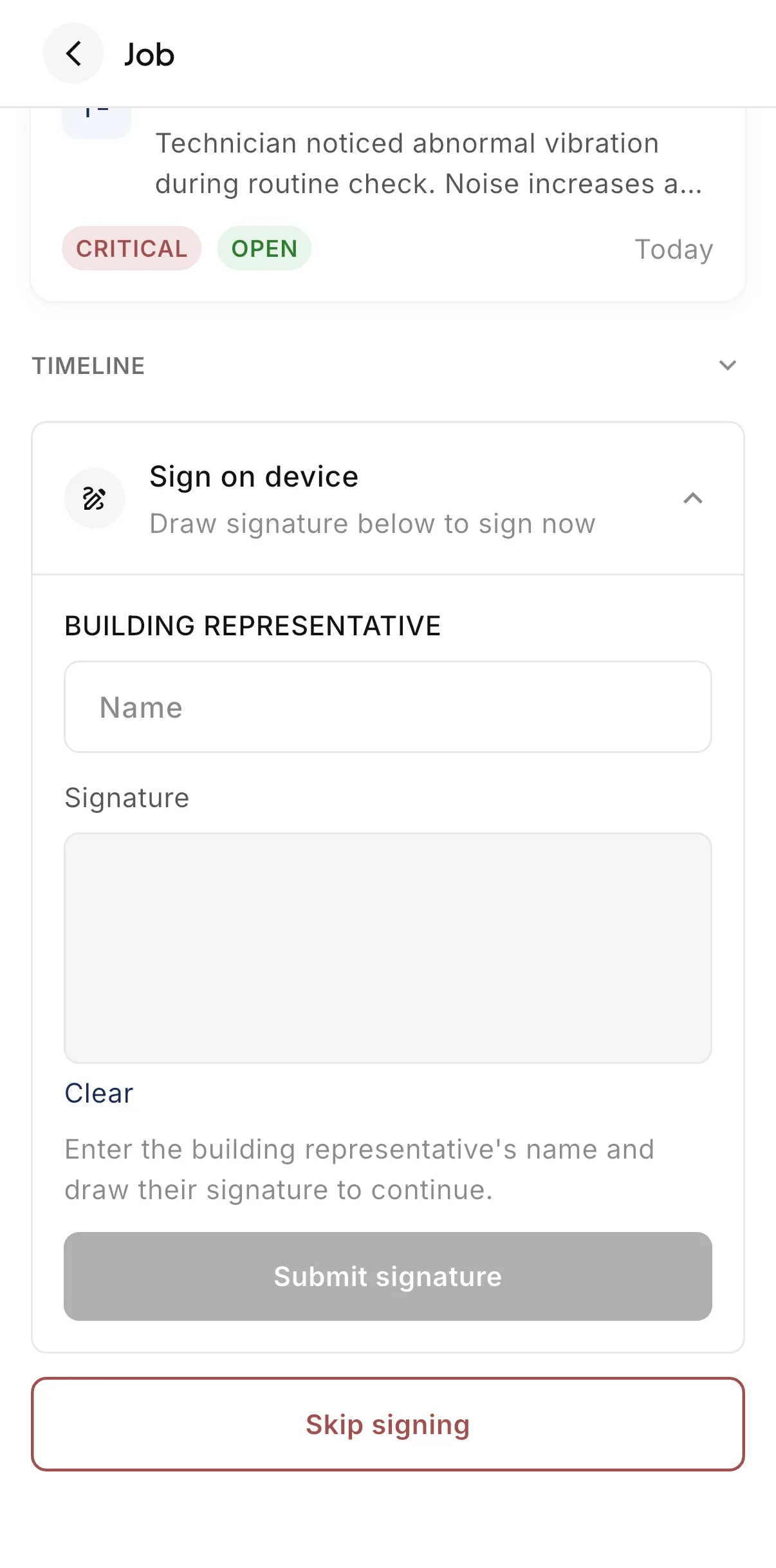
The Technician answers each item in the technician app, adds photos and remarks, and signs each Record. If the building representative is on site, they type their name and sign on the same phone.

This works offline. The signature is queued and sent when the phone has signal again.

The sign-off screen in the LiftAuth Ops technician app, with a name field and signature pad for the building representative.
03Sign-off later

The Building Manager signs from a link or their app.

When nobody can sign on site, the Technician shares a signing link and taps Sign later. Your office can also send the sign-off request by email to whoever the Building Manager put in charge of that building.

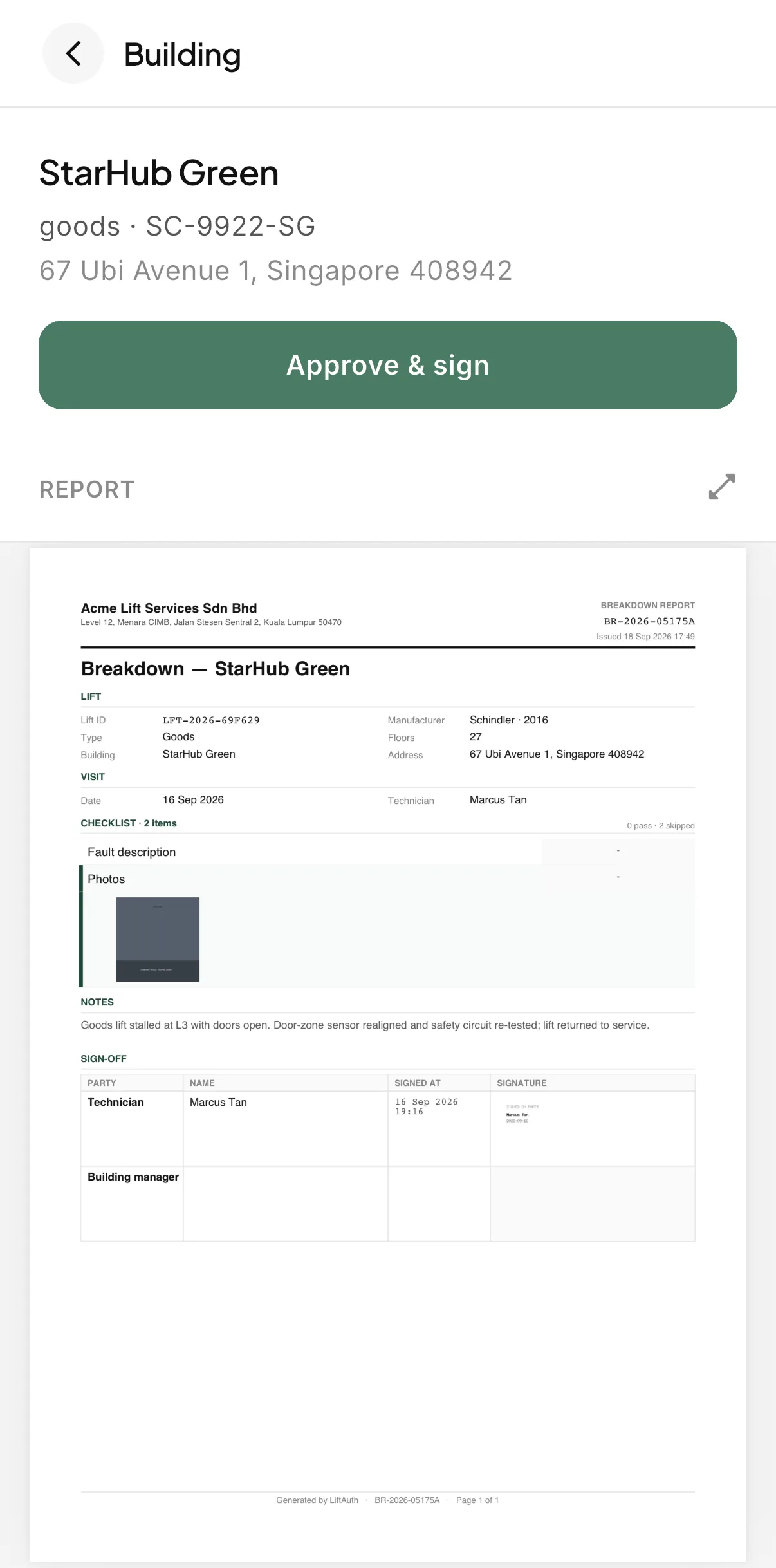
In the building manager app, the Record waits in the Inbox. The Building Manager reads the report and taps Approve & sign.

Signing linkSend to building managerApprove & sign
The sign-off screen in the LiftAuth Building Manager app, showing the elevator's report and the Approve and sign button.
04Filed in Drive

Every Record is filed under its building.

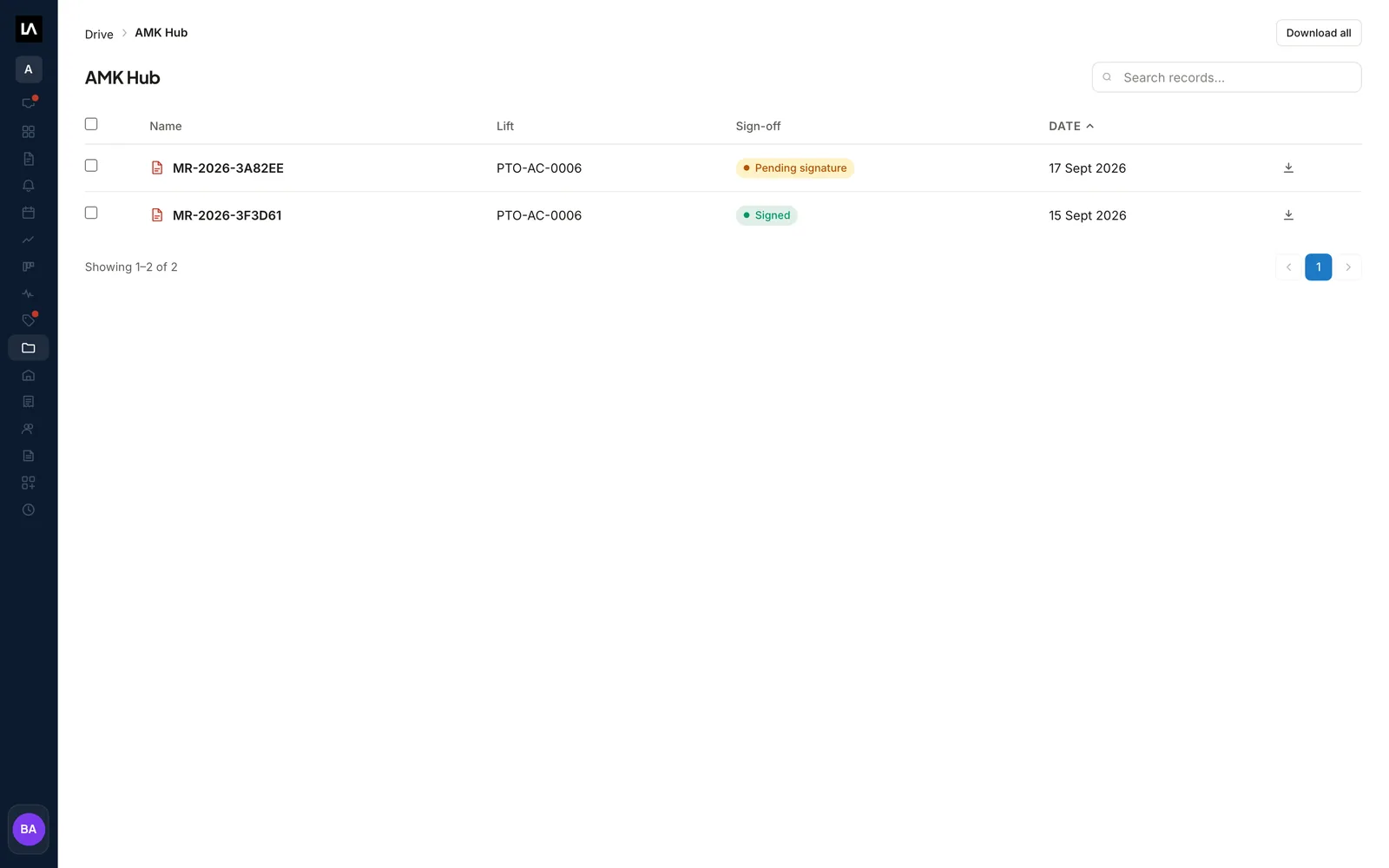
Each building gets its own folder in Drive, with one row per Record. Search by Record reference, sort by visit date, and open any Record to read the PDF.

A Pending signature badge shows which Records still need signing. Technicians can open Drive too.

Building foldersSign-off badgesDownload all
A building folder in Drive listing two Records with their elevator, sign-off status and visit date.

Service records before and after LiftAuth.

BeforePaper forms
  1. Paper job sheets filled in on site and typed up later
  2. Photos kept on each Technician’s phone
  3. A signature missing until someone goes back for it
  4. Scanned copies spread across shared folders
WithLiftAuth
  1. Your own forms filled in on the Technician’s phone
  2. Photos and remarks attached to each item
  3. Signed on site, or later through a signing link
  4. Every Record filed by building the moment it is submitted

LiftAuth compared with paper forms and shared folders.

Records and forms in LiftAuth compared with paper forms and shared folders
CapabilityLiftAuthPaper forms and shared folders
Forms on siteOn the Technician’s phone, offlinePrinted sheets
Required answersSubmit blocked until answeredChecked by hand later
Last reading on the formShown with its dateLooked up in old sheets
Remote sign-offSigning link, no account neededScan, email and wait
FilingAutomatic, by buildingFiled by hand

More of the platform.

Records and forms questions

Can I build my own elevator inspection forms?

Yes. Owners and Admins build record templates in the web dashboard, as many maintenance forms as they need. Each maintenance form is assigned to elevators on a Maintenance Contract.

Can I keep the layout of my existing paper form?

Yes. Upload the form as a flat PDF and place a box for each answer. LiftAuth stamps the Technician’s answers onto your layout.

Does the Building Manager need an account to sign?

No. A signing link opens in a browser, and whoever opens it can sign. A link works for 7 days and can be used once.

What if nobody can sign on site?

The Technician sends a signing link and taps Sign later. If nobody will sign, the Technician can skip signing. The Record then has no Building Manager signature, and skipping can’t be undone.

Can a Record be changed after it is submitted?

No. Nobody can edit a Record once it exists. If something is wrong, the visit has to be recorded again.

Can I add Records from before we used LiftAuth?

Yes. Record past visits files the date, elevators, Technician and notes for an older visit, with its PDF if you have one. It appears in the building’s Drive folder.

Put your own forms on your Technicians' phones.

To talk to us, email hello@liftauth.com or fill in the form here.

We use these details to reply to you and to see which pages you visited first. See our privacy policy.