



Elevator Management Software

The Smart Operating System for Elevator Companies

Maintenance visits, call-outs, Issues, Quotes and Invoices, and inspections all in one AI system.

In use in Singapore by
XIO Lift SG ITE College East Hin Chong C&W Services

Most office time goes on scheduling, paperwork and test dates.

Most contractors run visits, breakdowns, job sheets and test dates from spreadsheets, paper and phone calls.

An inspection for every elevator, every year

Each elevator’s inspection or test has to be booked, witnessed and filed on time. With a few hundred elevators, that is a few hundred dates to book and get agreed.

Job sheets typed twice

Technicians fill in paper job sheets, and the office types them up again for Records and Invoices. Breakdowns are dispatched by phone.

Calls from Building Managers

Property managers and building owners call to ask when the inspection is, whether a defect is fixed and what an Invoice covers.

One maintenance visit: 30 minutes of admin on paper, 1.5 minutes in LiftAuth.

Before · on paper30 min
  1. Print the form and take it to the site
  2. Fill it in by hand in the machine room
  3. Find the super to sign two paper copies
  4. Type it into a spreadsheet back at the office
  5. File the copy and write the Invoice by hand
After · in LiftAuth1.5 min
  1. Open the Job on the phone at the elevator
  2. Fill it in on the phone, even with no signal
  3. Sign off on the phone, with the time recorded
  4. The Record is filed under the building, with nothing retyped
  5. A draft Invoice is ready to issue to the Building Manager

What LiftAuth does for each elevator.

The main parts of LiftAuth, from routine maintenance to the annual inspection.

01Maintenance

Maintenance visits are created from the Maintenance Contract.

Set up a Maintenance Contract once and LiftAuth creates the visits. Each Job is signed off on site, and the contract decides whether an Invoice is drafted.

Auto-schedulingCalendarOffline mobileInvoicing
02Issues

Log faults as Issues, and dispatch breakdowns.

An Issue is one fault on one elevator. Technicians log it on site with photos and video, and it stays open until it is fixed. Your office and the Building Manager both see it.

For a breakdown, your dispatcher rings Technicians’ phones, and the first to accept takes the call-out.

Photos & videoDispatchSeverity
03Fault Analytics Pro

See which faults keep coming back.

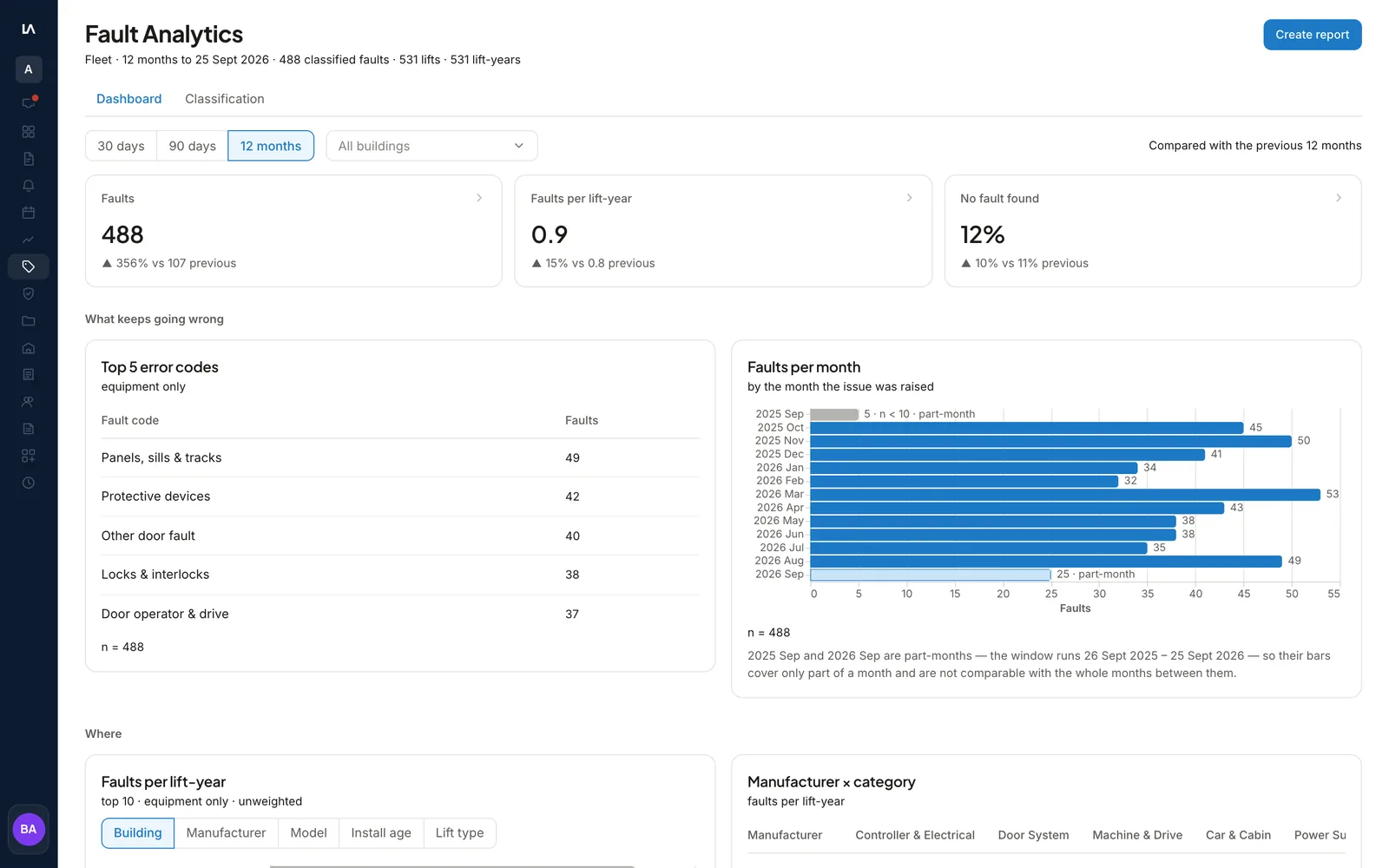
Your office gives each Issue a fault code and a cause: Equipment, Misuse or Building / third-party. Fault Analytics shows the most common fault codes, and faults per elevator-year by building, manufacturer, model and age.

You can download a period’s report as a PDF to share with the Building Manager, with a written analysis drafted by AI.

Fault codesManufacturer & modelPeriod report
Fault Analytics in LiftAuth: total faults, faults per elevator-year and no-fault-found rate, the top five fault codes, and faults by month.
04Repairs, parts & billing

Quote the repair, use parts from stock, and invoice when the Job closes.

Send a Quote for the Building Manager to accept. Parts come from your stock, with Inventory on Pro. Larger repairs run as a project, with a Purchase order stage. A draft Invoice can follow when the Job closes.

QuotesInventoryPurchase ordersInvoicing
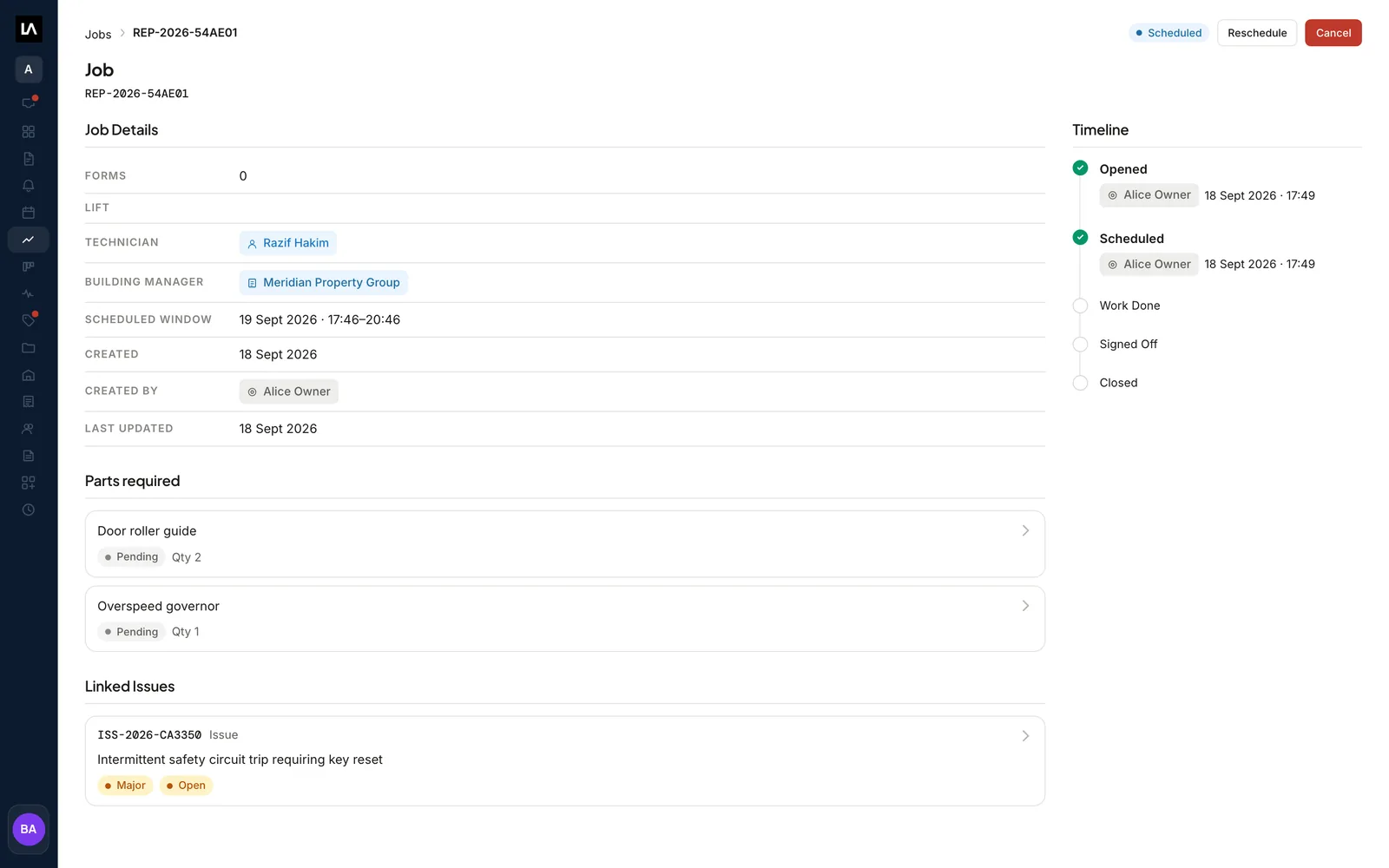
A repair Job in LiftAuth: its Technician, its Building Manager, the parts it needs and the Issue it came from, beside its timeline.
05Annual inspections

Track every annual inspection, and let the Auditor book the time.

Annual Inspections lists every elevator’s next due date, soonest first. Elevators with no date or no Auditor (the witnessing agency) are listed separately so you can fix them first.

Send the Auditor one booking link. They pick an hour from your Team’s calendar, you confirm it, and the Building Manager agrees to it.

Due datesBooking linkBuilding Manager agreementTeam calendar

Three apps on the same records.

Your Technicians, your Building Managers and your office each have their own app.

Technician app

Technicians see today’s Jobs, fill in each form and get it signed. The app works offline in the machine room and syncs when the signal returns.

Building manager apps

Building Managers see the visits to their elevators, accept Quotes, see Invoices and sign off finished work, on their phone or on a computer. See what they see.

Office dashboard

Scheduling, dispatch and invoicing for the whole portfolio, and the annual inspection status of every elevator. Pro adds inventory.

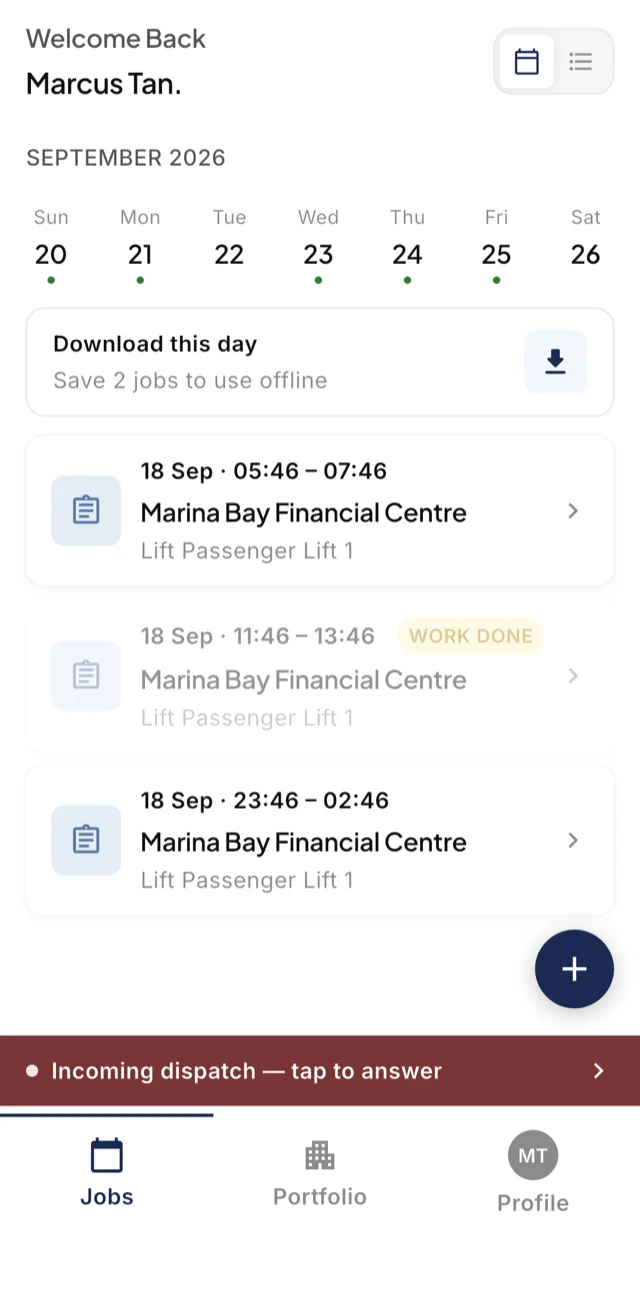
The LiftAuth technician app showing a week of scheduled Jobs, an offline download for the day, and an incoming emergency dispatch.
Technician app
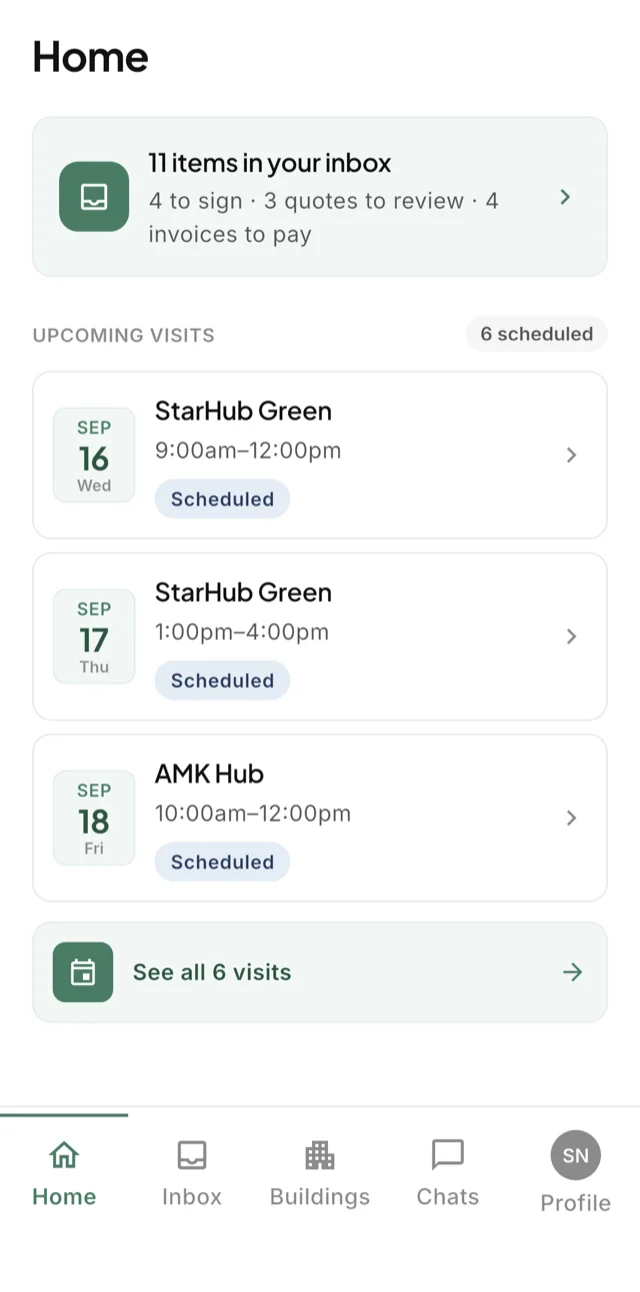
The LiftAuth building manager app: an inbox of items to sign, Quotes to review and Invoices, above the upcoming visits.
Building manager app

How LiftAuth compares with general field service software and ERPs.

Field service software and ERPs cover parts of an elevator contractor’s work. The elevator-specific parts, like annual inspections and fault codes, usually end up in spreadsheets.

CapabilityLiftAuthGeneral field service softwareERP platforms
Maintenance ContractsIncludedTypically includedVaries
Annual test due-date registerIncludedRarelyRarely
Witness self-bookingIncludedRarelyRarely
Elevator fault analyticsIn ProRarelyRarely
Building manager appsIncludedCustomer portal variesRarely
Offline mobile appIncludedTypically includedVaries
BillingIncludedVariesTypically included
InventoryIn ProVariesTypically included

This table compares general software categories.

What LiftAuth saves contractors using it today.

100%
of visits written to the elevator’s maintenance record, automatically
20×
faster job admin: 30 minutes of paperwork down to 1.5 minutes
30 days
of office work saved every month on a 500-elevator portfolio

LiftAuth, designed for your state’s compliance.

Try LiftAuth on your own elevators.

To talk to us, email hello@liftauth.com or fill in the form here.

We use these details to reply to you and to see which pages you visited first. See our privacy policy.