Annual inspections

Elevator annual inspection tracking and booking.

LiftAuth lists every elevator by its next inspection due date. The Auditor (the witnessing agency) picks a time from your Team’s calendar, and the Building Manager agrees to it.

What is annual inspection tracking in LiftAuth?

Annual Inspections tracks when each elevator’s next inspection is due and books the visit. Booking one inspection means three parties agreeing on one hour:

  • Your Team, who attend.
  • The Auditor, the witnessing agency.
  • The Building Manager, who agrees to the time.

In New York City, add the witnessing agency for each Cat 1 test as an Auditor.

LiftAuth for NYC contractors →   The NYC Cat 1 deadline →

What’s included in annual inspections.

A register of due dates

Every elevator with its Auditor and next due date, soonest first. Search by building or elevator, or narrow to one Auditor.

Needs attention

Elevators with no due date or no Auditor are listed on top. Set either one from the list.

Auditors

Add each firm with the people you reach there, by email or message. Each firm gets its own booking link.

One booking link

The link lists every elevator of yours waiting for a booking, so the Auditor books a batch in one visit.

Your Team’s availability

The Auditor can book only free hours. Your Team’s calendar entries and scheduled Jobs both count as busy.

Building Manager agreement

Email the agreement link, or record an agreement reached by phone.

A new time

The Building Manager or your office can ask the Auditor for another time, with a note saying why.

A history for each inspection

Each inspection keeps a history of every step: links sent and opened, times picked, confirmed and agreed.

From due date to an agreed inspection time.

01Add the inspection

Assign the Team and set how long the visit takes.

On the register, select Add inspection on the elevator. Pick the Team that will attend and the duration. You can also set a Not before date.

The dialog shows how many free slots that Team has, so you find out before the Auditor does if a Team is fully booked.

TeamDurationNot before
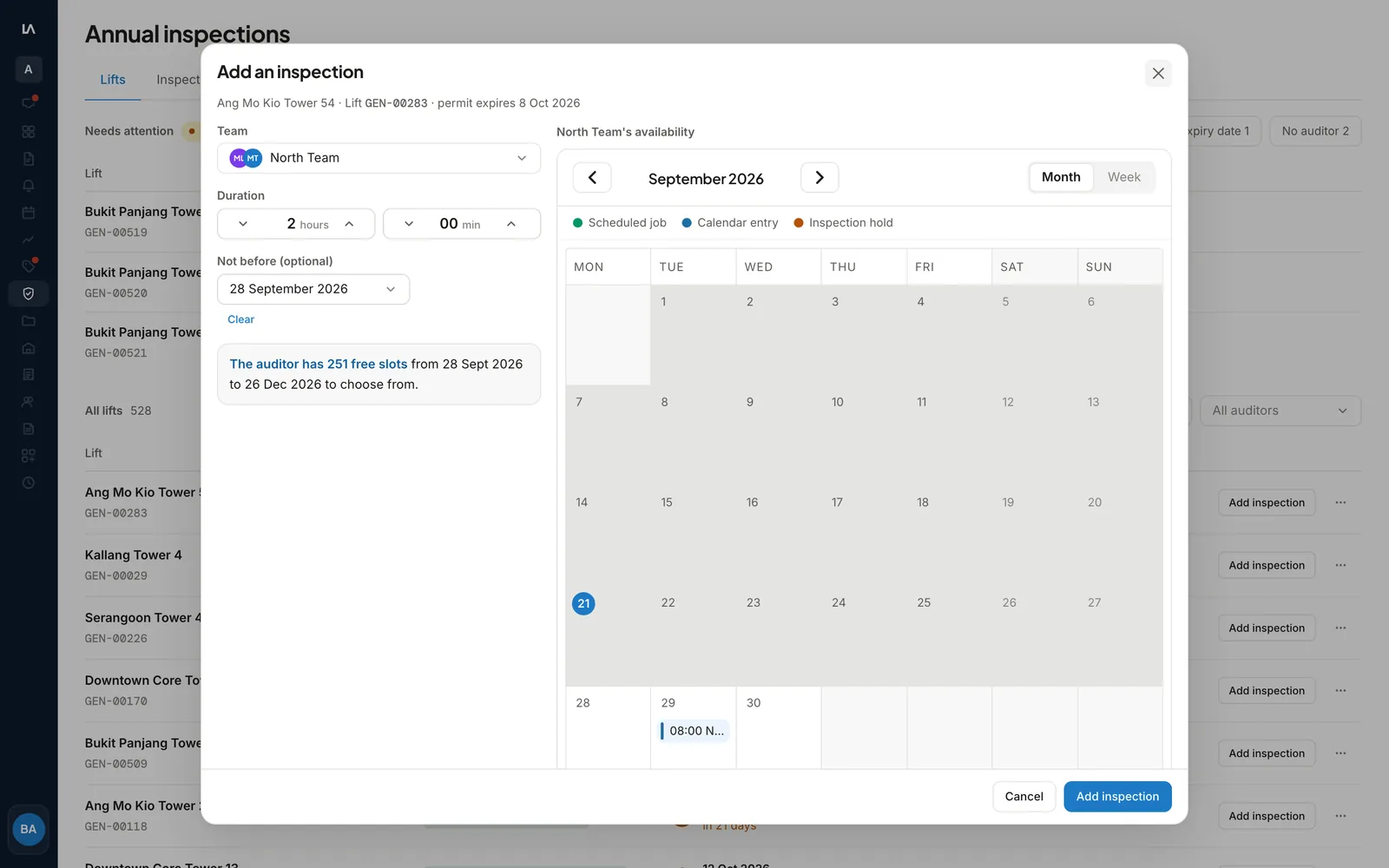
The Add an inspection dialog with the Team, duration and Not before date, beside the Team's month calendar and its count of free slots.
02The Auditor books

The Auditor picks an hour from the booking link.

Send the Auditor their booking link by email, message or a copied link. They need no account. The page lists your elevators waiting for a booking, with the address, duration and due date of each.

Your Team’s other work shows only as Technicians busy blocks, with no building, Building Manager or Job type. The chosen hour goes on the Team’s calendar as a hold.

Booking linkTeam calendarNo double-booking
03The building agrees

You confirm the time and the Building Manager agrees.

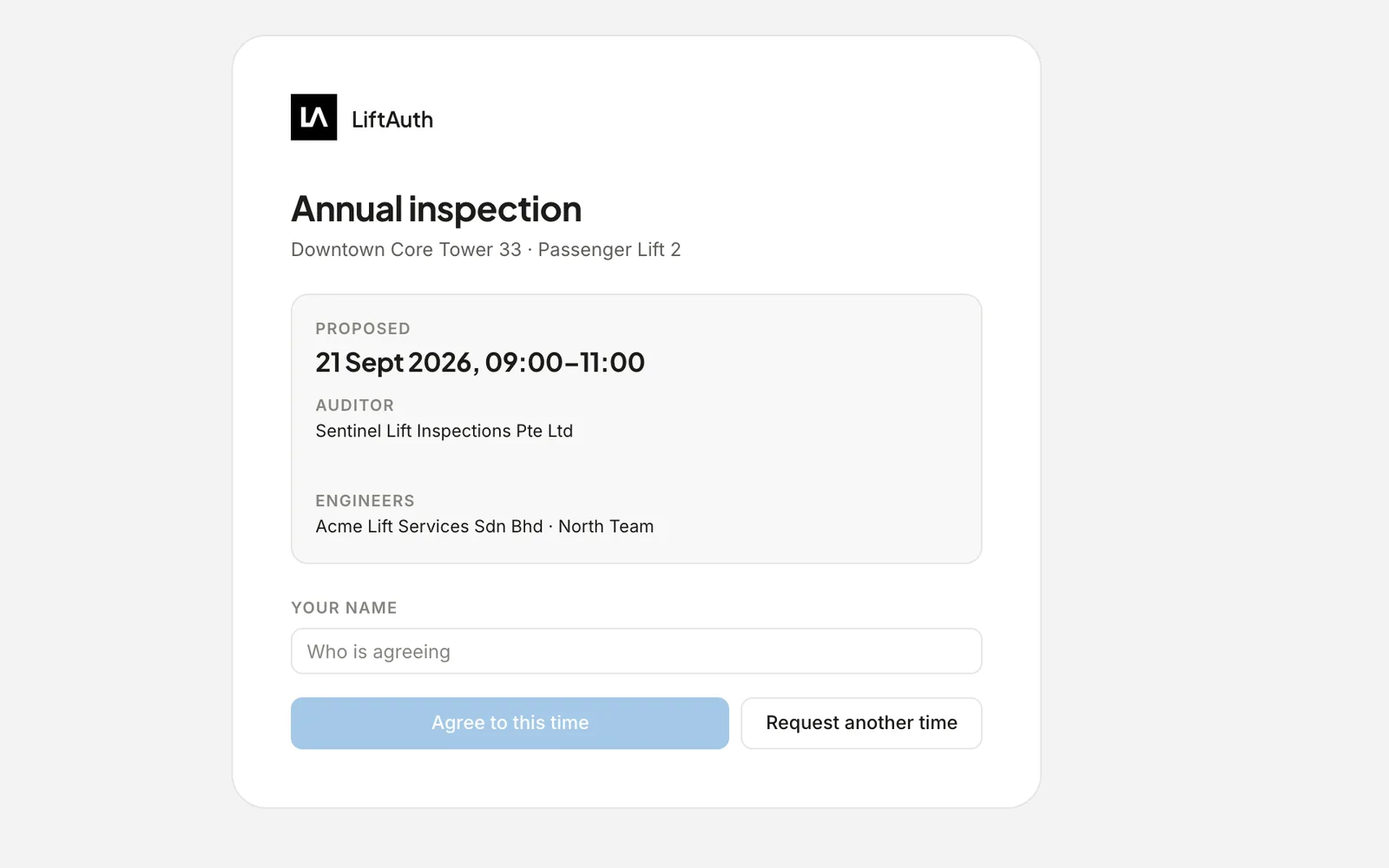
Select Confirm booking, then Email the agreement link. The Building Manager sees the proposed time, the Auditor and your Team. They type their name and agree, or request another time with a note.

Once they agree, LiftAuth emails the Auditor to confirm the time. After the inspection, enter the next due date and the inspection closes.

Confirm bookingAgreement linkEnter next due date
The agreement page the Building Manager opens, with the proposed time, the Auditor and Team, and buttons to agree or request another time.

What LiftAuth doesn’t do

  • It doesn’t file in DOB NOW: Safety. The performing agency files.
  • It doesn’t count down the defect correction or affirmation of correction deadlines.
  • It doesn’t know when the inspection took place. The inspection stays at Agreed until someone enters the next due date.

Annual inspections before and after LiftAuth.

BeforeSpreadsheets
  1. Due dates kept in a spreadsheet
  2. Calls and emails with the witnessing agency to find a time
  3. The building told the time separately
  4. A changed time passed on by phone to everyone
WithLiftAuth
  1. Every elevator listed by its next due date
  2. The Auditor picks an hour your Team has free
  3. The Building Manager agrees from an emailed link
  4. A new time requested in LiftAuth, with the Auditor emailed

LiftAuth compared with spreadsheets and email.

Annual inspection tracking in LiftAuth compared with spreadsheets and email
CapabilityLiftAuthSpreadsheets and email
Due datesEvery elevator, soonest firstSorted by hand
Missing dates or AuditorsListed under Needs attentionFound when someone looks
Finding a timeThe Auditor picks from your Team’s free hoursCalls and emails
Building Manager agreementAgreement link, recorded with a nameAn email reply
Team calendarHeld when booked, released when movedUpdated by hand

More of the platform.

Annual inspection questions

Does the Auditor need a LiftAuth account?

No. Each Auditor uses one booking link. It doesn’t expire, so treat it like a key. Regenerate link stops the old one at once.

What does the Auditor see of our calendar?

Only the elevators waiting for their booking, and your Team’s other work as Technicians busy blocks. The blocks show no building, Building Manager or Job type.

What if the Building Manager can’t make the time?

They select Request another time and leave a note. LiftAuth takes the hold off your Team’s calendar and emails the Auditor the old time and the note, so they can pick again.

What if the time stops working for our firm?

After you confirm the booking, select Request a new time and give a reason. LiftAuth emails the Auditor, who picks a new hour from their link. If the Building Manager was already asked, they are told the old time is off.

Does LiftAuth handle NYC Cat 1 tests?

It tracks each elevator’s due date and books the time with the witnessing agency as an Auditor. It doesn’t file in DOB NOW: Safety. See the NYC Cat 1 deadline.

See every elevator's next inspection in one list.

To talk to us, email hello@liftauth.com or fill in the form here.

We use these details to reply to you and to see which pages you visited first. See our privacy policy.